
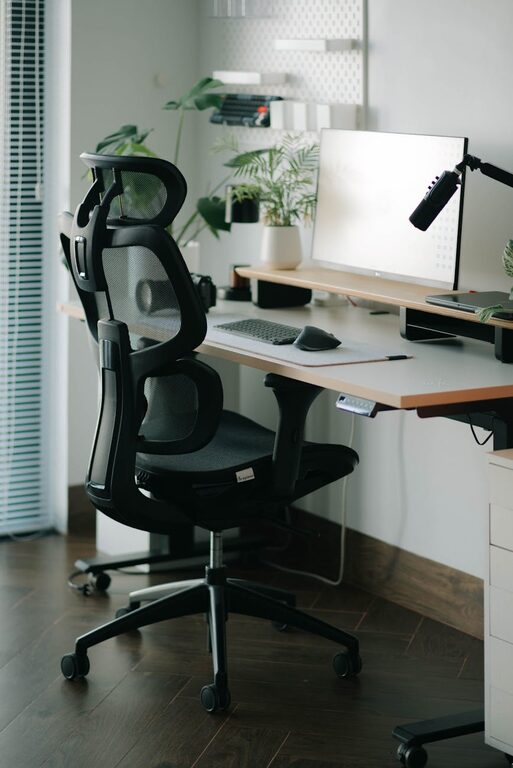
Creating a productive home office environment is key to successfully working from home. Whether you are new to remote work or simply looking to improve your current setup, small changes can make a big difference in how you feel and perform throughout the day. This guide will provide helpful tips to help you design a workspace that supports focus, organisation, and well-being.
Choose the Right Location
Selecting the right spot in your home for a dedicated office space is the first step. Ideally, it should be quiet, well-lit, and away from distractions such as a busy kitchen or TV area.
– Natural Light: Position your desk near a window if possible. Natural daylight helps reduce eye strain and can improve mood.
– Privacy: A room with a door allows you to close off work from personal life, promoting better focus.
– Space: Ensure there is enough room for your desk, chair, and any necessary equipment or storage.
Invest in Comfortable Furniture
Comfort is crucial when spending long hours at your desk. Invest in furniture that supports good posture and reduces physical strain.
– Ergonomic Chair: Choose a chair with adjustable height and lumbar support to maintain a healthy spine alignment.
– Desk Height: Your desk should be at a comfortable height to rest your arms without straining your shoulders.
– Footrest: Consider a footrest if your feet do not sit firmly on the ground.
Organise Your Workspace
A clutter-free desk can help keep your mind clear and improve productivity. Establish a system to organise your tools, papers, and digital devices.
– Declutter Regularly: Remove unnecessary items that take up space or distract you.
– Storage Solutions: Use shelves, drawers, and organisers to keep supplies and documents neatly arranged.
– Cable Management: Keep cables tidy with clips or covers to avoid tangles and hazards.
Optimise Lighting and Screen Setup
Proper lighting and screen placement help reduce eye strain and fatigue.
– Balanced Lighting: Use a combination of natural light and artificial lighting, such as a desk lamp with adjustable brightness.
– Screen Position: Place your monitor at eye level about an arm’s length away to prevent neck and eye discomfort.
– Anti-Glare: Use blinds or curtains to reduce screen glare, especially during bright daylight hours.
Limit Distractions
Staying focused when working from home can be a challenge. Create boundaries to minimise interruptions and maintain concentration.
– Establish Boundaries: Communicate your working hours to household members to avoid disturbances.
– Turn Off Notifications: Silence non-essential phone and computer alerts during work periods.
– Background Noise: Use noise-cancelling headphones or play white noise if there are distracting sounds nearby.
Maintain a Consistent Routine
Keeping a regular schedule helps your brain get into “work mode” and improves time management.
– Set Work Hours: Define specific start and finish times for your workday.
– Breaks: Take regular short breaks to stretch and rest your eyes; this improves overall productivity.
– Morning Ritual: Develop a ritual before work such as a cup of tea or a brief walk to signal the start of the working day.
Personalise Your Space
Adding small personal touches can make your workspace inviting and motivate you to spend time there.
– Plants: Indoor plants can improve air quality and add a calming element.
– Artwork or Photos: Display items that inspire or make you happy, but avoid cluttering.
– Comfort Items: A cosy blanket or cushion can add comfort and promote relaxation during breaks.
Equip Your Home Office with the Right Technology
Reliable and up-to-date technology is vital for smooth remote working.
– High-Speed Internet: Ensure your connection is fast enough to support video calls and cloud-based tools.
– Quality Headset and Webcam: Invest in good audio and video equipment for effective communication.
– Backup Solutions: Use cloud storage or external drives to protect important files.
Keep Healthy Habits in Mind
Your physical and mental health greatly affect your productivity. Incorporate habits that support well-being.
– Hydration: Keep water at your desk to stay hydrated throughout the day.
– Movement: Stand up, stretch, or do light exercises regularly to reduce stiffness.
– Air Quality: Ventilate your workspace or use an air purifier to maintain fresh air.
—
By following these tips, you can create a home office environment that supports focus, comfort, and efficiency. Remember that every individual’s needs differ, so tailor your workspace to what helps you work best. A well-designed home office not only boosts productivity but also contributes to a better work-life balance.